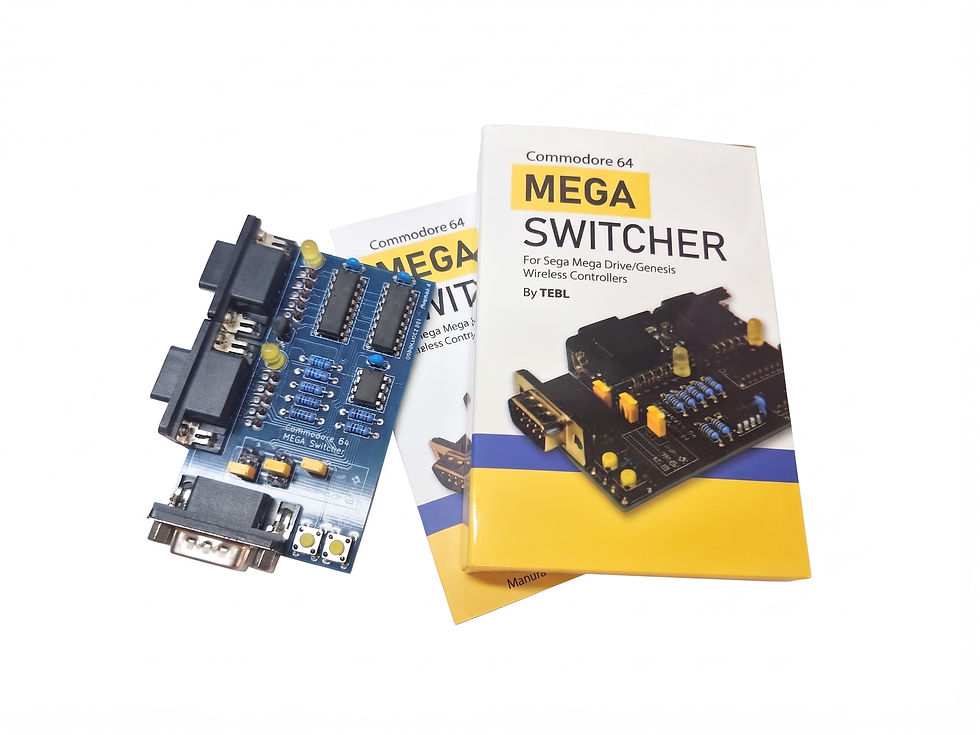
Stop wearing out your Commodore 64's ports and cables! The Commodore 64 Joystick Switcher (Revision C) lets you instantly toggle your joystick or mouse between Port 1 and Port 2 at the push of a button.
Based on the open-source hardware design by Tor-Eirik Bakke Lunde (tebl), this device combines seamless electronic switching with essential hardware protection.
Key Features & Benefits
One-Touch Switching: Instantly redirect your controller between Port 1 and Port 2 without touching a cable.
CIA Chip Protection: Features built-in static protection to safeguard your C64’s sensitive 6526 CIA chips from static discharge during controller swaps.
Integrated Auto-Fire: Includes an adjustable autofire circuit (with an onboard dial/potentiometer) to save your thumbs during intense shooters.
Dual-Button & Multi-Controller Support: Fully compatible with standard Atari-style joysticks, multi-button controllers, and even the Commodore 1351 mouse.
Full 9-Pin Logic: Electronic switching handles all 9 pins simultaneously for reliable performance.
Technical Specifications
Board Revision: Revision C (Design by Tor-Eirik Bakke Lunde / tebl)
Interface: Dual female DB9 connectors for direct connection to C64 control ports 1 and 2; male input port for your controller.
Switching Logic: Full 9-pin electronic routing
Quick Start Guide
Connect Safely: Ensure your Commodore 64 is powered OFF. Plug the two female DB9 connectors directly into Ports 1 and 2 on your computer.
Plug In Controller: Connect your joystick, gamepad, or mouse into the switcher's input port.
Power On: Turn on your C64.
Select Your Port: Press the dedicated button for Port 1 or Port 2 to map your controller instantly. (Note: If a game doesn't respond on startup, just press the button for the required port to activate it.)
Tune Auto-Fire: Turn the onboard potentiometer dial to adjust the auto-fire frequency to your preference.